Cara mem-foward e-mail
1. buka gmail, masukkan alamat gmail,klik berikutnya.
2. masukkan pasword kamu, dan klik berikutnya maka kalian sudah masuk ke gmail.
3. klik inbox kalian kemudian pilih file yang kalian terima dan klik
4. di bagian bawah ada tulisan teruskan, dan klik
5. di kolom kepada tulislah alamat yang kalian tuju
6. dan klik kirim
Minggu, 28 Oktober 2018

Minggu, 21 Oktober 2018
cara melampirkan file/attach file
1. buka gmail, masukkan alamat gmail,klik berikutnya.
2. masukkan pasword kamu, dan klik berikutnya maka kalian sudah masuk ke gmail.1. buka gmail, masukkan alamat gmail,klik berikutnya.
3. klik compose/tulis,kemudian di bawah ada seperti klip kertas atau disebut lampirkan file atau attach file dan klik.

 4. pilihlah file yang akan kalian masukkan
1. buka gmail, masukkan alamat gmail,klik berikutnya.
2. masukkan pasword kamu, dan klik berikutnya maka kalian sudah masuk ke gmail.1. buka gmail, masukkan alamat gmail,klik berikutnya.
3. klik compose/tulis,kemudian di bawah ada seperti klip kertas atau disebut lampirkan file atau attach file dan klik.


Minggu, 26 Agustus 2018
HOW TO SEND EMAIL
Step 1: Log in to your Gmail account so that you are on the dashboard (main page) of your mail account.
Step 1: Log in to your Gmail account so that you are on the dashboard (main page) of your mail account.
Step 2: Click Compose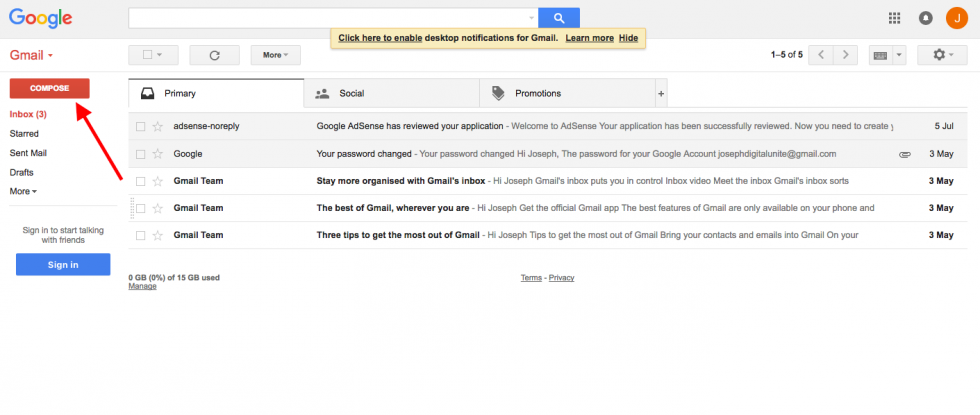
Step 3: A new blank email window will open up. In the ‘To’ box, type in the email address .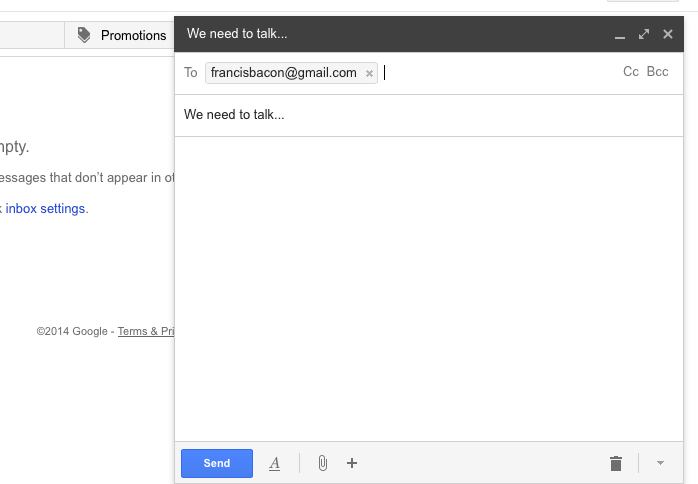
Step 4: You might want to include someone else in your email to ‘keep them in the loop’. You can do this by clicking Cc or Bcc, which will open another field. ‘Cc’ means ‘carbon copy’ and ‘Bcc’ means ‘blind carbon copy’. Adding an email address to the ‘Cc’ field means that that person will receive a copy of the email and all the other recipients will see their email address. If an email address is put into the 'Bcc’ field, the person will get a copy of the email but no other recipient will see that address.
If you are sending the same email to lots of different people, it’s a good idea to put all the email addresses in the ‘Bcc’ field to keep your ‘mailing list’ confidential. That way, there’s no chance that it could fall into the hands of a spammer or hacker.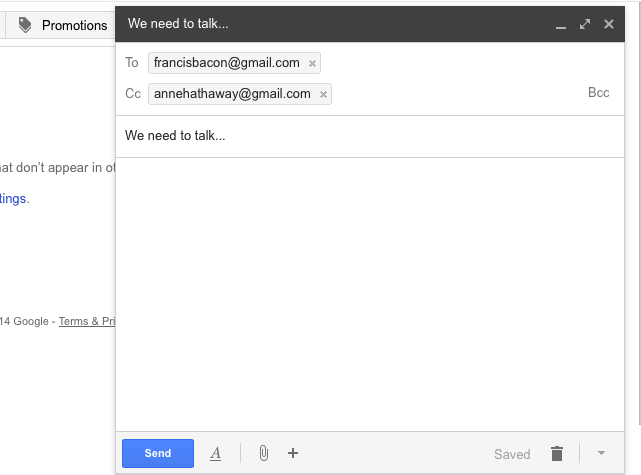
Step 5: The subject field allows you to give the recipient an idea of the topic of your email, like a heading. You don’t have to put anything in the subject box, but it can help when viewing and sorting email.
Step 6: Email text can be formatted in a similar way to text in a word document. You can change the font style, colour and size using the formatting icons. You can also create bullet points and check the spelling of your email. Choose your formatting from the menu shown.
Step 7: Type your message in the main body field of your email.
Step 8: When you’re happy with your email, click the blue Send button at the bottom of the compose window.
Step 9: The email you’ve sent will now be stored in the ‘Sent Mail’ folder on your Gmail dashboard. You may have to run your mouse pointer over the Inbox folder link to see the other folders.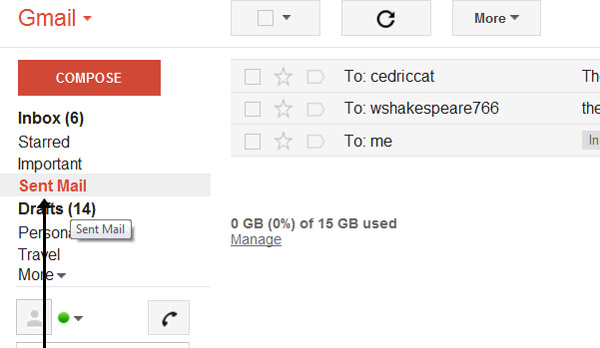
Step 10: You may start an email but then decide to come back to it later rather then sending it straightaway. Gmail saves your drafts automatically. So you can simply close the email and the unfinished email will be saved to your ‘Drafts’ folder. When you decide that you’re ready to send it, you can retrieve it from the ‘Drafts’ folder by clicking Drafts and then clicking the correct item in the ‘Drafts’ folder list. Finish the email and click Send as normal.
https://digitalunite.com/guides/email/how-send-email
Minggu, 19 Agustus 2018
How to send an email
 2.At the top left, click write the image in the form of a clamp
1.first open your gmail
2.At the top left, click write the image in the form of a clamp
3.Write the address that will receive what you sent
this picture is quoted inL:https://penablog.com/wp-content/uploads/2015/01/mengirm-file-gmail-HP.png
4.Write the subject
5.Write your message to the recipient
6.Then at the bottom there is a text send then click, and sent
Langganan:
Postingan (Atom)